Build log · Social & Multiplayer
How I built Pixel Place
A shared 64x64 r/place-style canvas, one pixel per visitor every five minutes
1.Why I built it
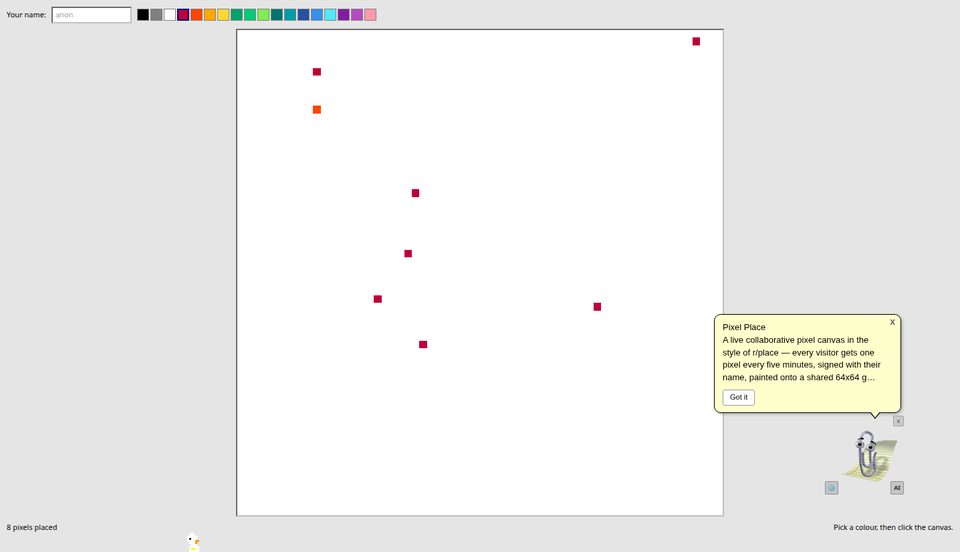
Pixel Place is a small version of r/place. Everyone who visits shares one 64x64 canvas and can place one pixel every five minutes, so anything bigger than a few dots has to be built by many people over time. Hovering a pixel shows the name of whoever placed it.
It was also a good test of how little code a realtime shared canvas needs when the backend pushes updates for you.
2.How it works
Store only what has been placed
The pixels table holds one row per painted cell with x, y, colour, name and time, indexed by x and y. An empty canvas is an empty table. Placing a pixel looks up the cell through the index and patches the row if it exists or inserts it if not, so the table never grows past 4096 rows.
The mutation validates everything itself: coordinates are floored and bounds-checked against the 64 cell size, colours must match a six-digit hex pattern, and names are cut to 20 characters.
Realtime with one query
The client calls useQuery(api.pixels.list), which returns every placed pixel. Convex re-runs the query whenever the table changes and pushes the result to every open client, so there is no polling or websocket code in the app.
A React effect redraws the canvas each time that result changes: fill white, then one fillRect per stored pixel at its cell size. Click coordinates are mapped back to cells by dividing the offset within the canvas's bounding rect by its width, so the canvas can be scaled to fit the window.
Cooldowns without accounts
The browser never sends its IP. A POST goes to /api/pixels, which reads the forwarded IP header, hashes it with SHA-256 and passes the hash to the mutation. A separate pixel_placers table stores the last placement time per hash, and the mutation rejects a placement within five minutes, returning how many milliseconds are left so the UI can count down.
A comment in the route is upfront about the limit: an IP is not a person, so people behind the same network share a slot and a VPN gets a fresh one. It is a speed bump against spam, not authentication.
3.Try it
Pick a colour, optionally type a name, click a cell to place your pixel, and hover any pixel to see who placed it.