Build log · Music & Audio
How I built Chime Rain
Draw glass chime bars, add faucets, and every bouncing ball rings a note in key
1.Why I built it
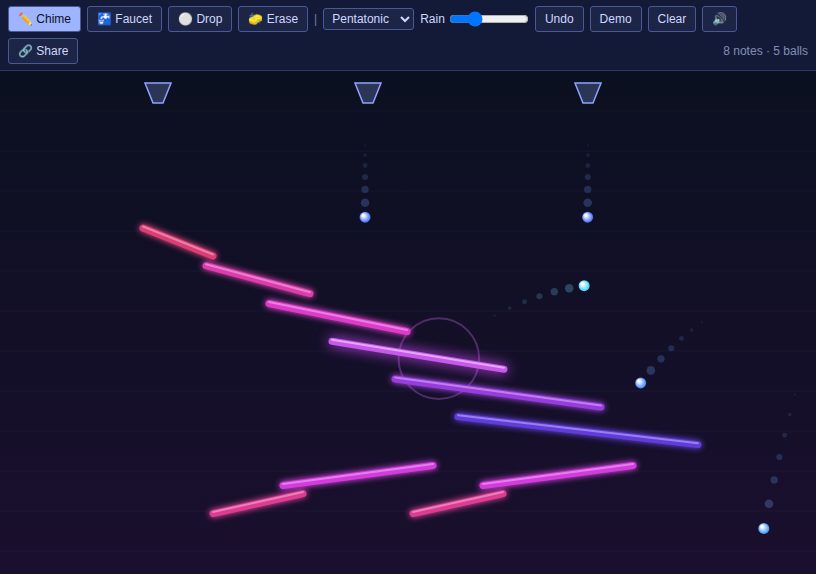
Chime Rain is a physics music box. You draw glass bars, faucets drop balls onto them, and every bounce rings a note. The music comes out of where you put things, the way a marble run makes rhythm from its layout.
I kept the mapping simple enough to play with on purpose: a bar's length sets its pitch, quantised to the chosen scale so any layout stays in key, how hard a ball hits sets how loud the note is, and where the bar sits sets the stereo pan. Soon after, I added sharing through the URL so a layout can be sent as a link.
2.How it works
Length is pitch, snapped to a scale
Each bar stores a scale step index computed when it's drawn. Length is clamped between 26 and 360 px, normalised, and inverted so short bars ring high and long bars ring low, then rounded to one of steps * 3 + 1 positions covering three octaves above C3. Scales include pentatonic, major, minor, dorian, Hirajoshi and whole tone.
Because the index is stored and the frequency is looked up when the bar rings, changing the scale retunes every existing bar. Bar colour also comes from the index, running from cyan for low notes through magenta to red, so you can see the pitch layout.
Ball against segment collision
Balls are simple particles with gravity at 900 px/s², moved in 3 substeps per frame with the frame time capped at 33 ms. For each bar, the ball's position is projected onto the segment and clamped to its ends to find the closest point. If the ball is within its radius plus 2 px, it is pushed out along the normal, and if it is moving into the bar, its normal velocity is reflected with a restitution of 0.86.
The bar ends work for free: clamping the projection turns the end of the segment into a point collider, so balls roll off the tips in a natural way. Side walls reflect balls, and balls that fall off the bottom are removed. There's a cap of 70 balls and 6 faucets, with the oldest dropped first.
Stopping resting balls from buzzing
A ball sitting on a slope collides every substep, which would ring constantly. Two checks prevent that. A note only plays if the impact speed is above 55 px/s, and each bar keeps a Map from ball id to the time it last rang for that ball, ignoring repeats within 90 ms.
Loudness is the impact speed divided by 700 and capped at 1. Pan comes from the contact point's x position across the canvas, limited to plus or minus 0.9.
A glassy bell from three sines
Each note is three sine oscillators at 1, 2.76 and 5.4 times the fundamental, with amplitudes 1, 0.32 and 0.12. Those ratios are inharmonic, which is what makes it sound like struck glass instead of an organ. Higher partials decay faster, and the overall decay is longer for low notes (0.5 s plus up to 1.6 s more) so bass bars ring on.
Notes go to a compressor and to a reverb send. The reverb is a ConvolverNode with a 2.6-second stereo impulse response built from random noise shaped by (1 - i / len)^2.6, so there are no sample files at all.
Layouts as links
The scene is saved as compact JSON: scale name, rain rate, each bar as [ax, ay, bx, by, idx], and each faucet as [x, y, interval], with coordinates scaled to 0 to 1000 of the canvas so a layout fits any window size. A shared helper base64url-encodes it into the URL hash, as #chimerain:<data>.
The hash never reaches the server and the desktop's router ignores it. A timer calls history.replaceState every 800 ms when the state has changed, so the address bar always holds the current layout without adding history entries. On load, the hash is validated value by value before anything is rebuilt, and the demo staircase is used if there's nothing to restore.
3.Try it
Drag to draw a chime bar, switch to Faucet to place a ball source, Drop to throw balls by hand, and Erase or right-drag to remove things.