Build log · Music & Audio
How I built Doodle Loop
Draw lines on a grid and a looping playhead plays them, with curves as pitch bends
1.Why I built it
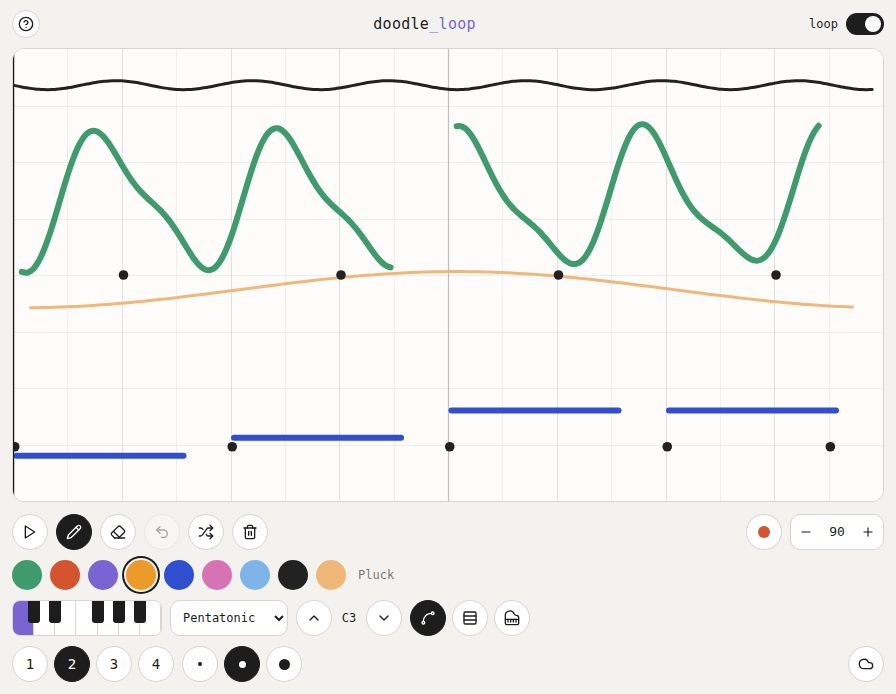
Doodle Loop is a drawing sequencer. A playhead sweeps across a grid, and wherever it crosses a stroke, that stroke plays. Height is pitch and the note follows the line, so a curve becomes a pitch bend instead of a staircase of steps.
I wanted drawing to be the whole interface. Colour picks the instrument, brush size sets how loud it is, a vertical stroke strums the scale and a dot is a blip. Edits land in the loop while it plays, and drawing previews the note under the pen.
2.How it works
Turning a stroke into something a playhead can read
Strokes are stored in normalised coordinates: x is loop phase from 0 to 1, and y runs from 0 at the top (high) to 1 at the bottom (low). A playhead needs a function y(x), but a hand-drawn circle doubles back on itself. So splitRuns cuts each stroke wherever the pen reverses direction in x, with a hysteresis of 0.006 phase so a small wobble doesn't count as a turn.
Each run is then forced to be non-decreasing in x, which smooths out small backtracks, and the pitch at any phase is found with a binary search plus linear interpolation (runY). A circle becomes two runs, an upper and a lower arc, that play at the same time as a chord.
Height to pitch on a scale
The canvas spans 3 octaves of the chosen scale, out of 9: pentatonic, major, minor, minor pentatonic, blues, dorian, lydian, In Sen and chromatic. yToDegree maps y to a continuous scale degree. In snap mode it is rounded to the nearest scale tone. In glide mode the fractional part blends between the two neighbouring tones' semitone values, so a sloped line bends smoothly through the scale instead of through every chromatic note.
Runs narrower than 0.008 of the loop are too short to hold a note. If one is near vertical, it becomes a strum of every scale tone it covers, up to 10 notes, spaced 0.0035 phase apart in the direction it was drawn. A single dot is a short blip.
Two timing systems
Sustained notes ride the animation frame. Each frame computes the phase from the audio clock, and for every run under the playhead it starts a voice or moves the existing one's pitch with setTargetAtTime, using a 25 ms time constant in glide mode or 4 ms when snapping. Plucks and bells re-strike their envelope every time the pitch crosses a scale degree. Voices whose run the playhead has left get released.
Drums, strums and dots are scheduled ahead on the audio clock, looking 120 ms forward and handling loop wrap-around, so they land on time even when a frame is late. Black strokes are drums: a drum line hits where it starts and then on every eighth note it passes through, and its height picks kick, snare or hi-hat.
Nine instruments from one spec table
Each instrument is a plain object: a list of oscillators with type, frequency ratio, detune and gain, an ADSR, a lowpass cutoff and Q, and optional extras. Those are a filter envelope that starts the cutoff high and settles (the pluck's snap), vibrato depth in cents, an FM modulator for the bell, and a stereo pan. One Voice class reads any spec, so a new instrument is a few lines of data.
Everything goes through a compressor to the speakers, with a reverb send built from a convolver on generated decaying noise and an echo whose feedback path runs through a 2.2 kHz lowpass, so each repeat is darker. The compressor also feeds a MediaStreamAudioDestinationNode, which MediaRecorder captures to make an audio file.
Generated doodles and a layout that fits
The generate button writes a small composition with a seeded PRNG: melody phrases made from the sum of two sines so they bend like hand-drawn waves, an optional long pad curve, bass dashes on each half bar, kicks and snares on alternating beats, and a hi-hat line across the top. Strokes and settings are saved to localStorage.
The app uses CSS container queries on its own window instead of media queries, so it reacts to the window size and not the screen. Narrow windows get compact controls, short wide ones (a phone in landscape) get a side panel, and it opens full-screen when 900x720 doesn't fit.
3.Try it
Pick a colour and draw on the grid; the playhead sweeps left to right and plays whatever it crosses, and the toolbar sets key, scale, tempo, loop length and space.