Build log · Simulations & Toys
How I built Wiki Crawler
An eight-legged crawler walks any Wikipedia article link by link and spins a web
1.Why I built it
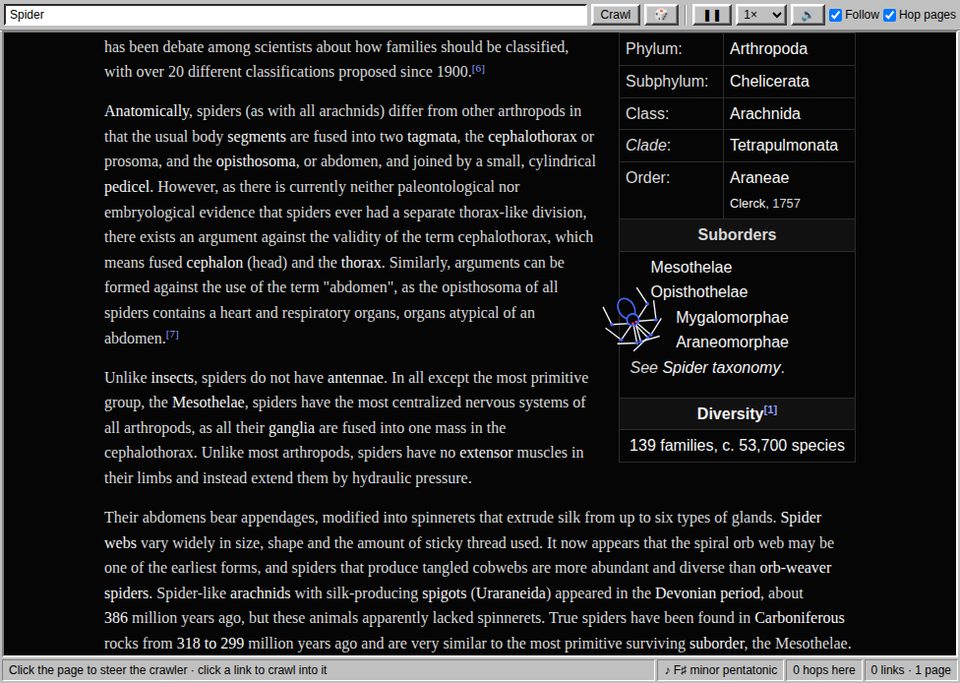
I wanted to see a Wikipedia article the way a crawler sees it: as a set of links to walk between. Wiki Crawler loads any article, and an eight-legged crawler walks it link by link, spinning a blue web between the links it touches, magnifying them and tearing out fragments of text, then hops into articles it found.
A day later I gave it a soundtrack, so every word the crawler walks over plays a note.
2.How it works
Fetching and cleaning articles in the browser
Everything goes through the public MediaWiki API with origin=*, so it works client-side with no proxy. The input accepts a title or a desktop, mobile or index.php Wikipedia URL, and keeps the language subdomain. If the exact title is missing, it falls back to the top search hit.
The returned HTML is parsed with DOMParser and stripped of scripts, styles, iframes, forms, images, navboxes, edit links and similar page furniture, and inline colours are removed so the article fits the app's look. Links into File, Category, Talk and other namespaces are not treated as crawlable articles.
Choosing where to walk
Link positions are measured from getBoundingClientRect into scroll-content coordinates and re-measured when the window resizes. pickNext() scores nearby links with a random value divided by distance, weighted toward links below the crawler so it moves down the page, and skips links visited in the last 90 seconds.
If nothing is close, as in a long paragraph or table, it drops to the nearest unvisited link below. When it runs out of page, it either hops to an article from its recent visits or lays down a long beam and climbs back to the top.
Legs with a gait and two-bone IK
The eight legs are split into two alternating groups. Each leg has an ideal foot position at a fixed angle and reach from the body. When a foot drifts too far from its ideal spot and the other group isn't mid-step, it lifts and eases to a new target slightly ahead of the body using a smoothstep curve. That alternating rule is enough to produce a walking gait.
Each leg is drawn as two 20 px segments solved with analytic two-bone IK: the knee angle is acos(d / 2·SEG). There are two solutions, and picking the knee further from the body is what makes it read as a spider leg.
Finding the word under the crawler
To know which word the crawler is standing on, the app calls caretPositionFromPoint (or caretRangeFromPoint in WebKit) at its position, expands outward over letter characters to the word boundaries, and builds a Range to check that the point really lies within the word's rectangle. It also checks whether the next characters end a sentence. Each word gets a fading pink underline.
A melody from the article
The soundtrack is synthesised with Web Audio, no samples. The article title is hashed with FNV-1a to pick a root note and one of five scales: major pentatonic, minor pentatonic, dorian, lydian or in-sen. Each word plays a triangle-wave note whose scale degree comes from a hash of the word and whose octave depends on word length, and sentence ends resolve to the tonic.
Notes are quantised to a 16th-note grid at 112 BPM: slot() rounds the current time up to the next grid line and drops the note if the queue is already more than 1.5 slots ahead, which keeps fast crawling from turning into mush. Footsteps are short bandpassed noise ticks, links ring, page hops arpeggiate, and a quiet drone holds the key.
3.Try it
Type an article title or paste a Wikipedia link, then watch; toggle sound, follow and page hopping.