Build log · Simulations & Toys
How I built Orb Bloom
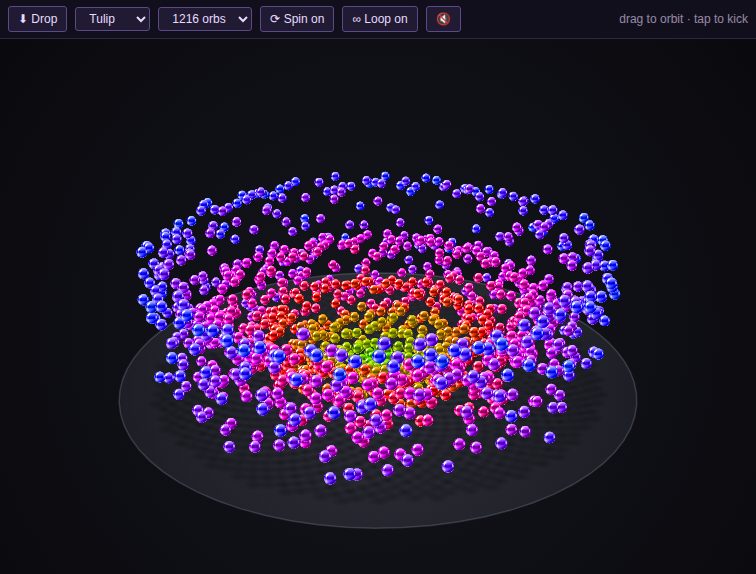
1216 chrome orbs on a sunflower spiral that bounce out of sync into domes and rings
1.Why I built it
Orb Bloom recreates an oddly satisfying clip of metal balls bouncing on a disc. A comment in the code even says the rim scatter is there to look like the reel. The effect comes from one simple fact: if every ball has a slightly different bounciness, a crowd dropped at the same moment drifts out of sync, and the surface they form keeps changing shape.
I wanted to see how far that idea goes with no collision between balls at all. Each orb only ever talks to the floor, and all the shapes come from how the bounce timings are laid out across the disc.
2.How it works
A sunflower layout
The orbs sit on a phyllotaxis spiral. Orb i is placed at angle i * GOLDEN, where GOLDEN = PI * (3 - sqrt(5)) is the golden angle, and at radius sqrt((i + 0.5) / n). The square root keeps the density even from centre to rim, so the disc fills without gaps or clumps.
The orb radius comes from the count: 0.5 * R * sqrt(PI / n) * 0.92, which is about the share of disc area each orb gets, minus a little spacing. That lets the same code work for 400, 800, 1216 or 2000 orbs.
Exact 1D bounces at 240 Hz
Each orb is just a height y, a velocity vy and a restitution e, stored in Float32Arrays. Physics runs at a fixed step of 1/240 s driven by an accumulator, capped at 120 substeps per frame so a background tab can't freeze the page when it comes back. When an orb goes through the floor, its position is reflected (h = -h * e) and its velocity flipped and scaled, so no energy is gained or lost by overshooting.
Once a bounce comes out slower than REST_V = 0.12, the orb is marked at rest and skipped. When every orb is resting for 2.2 seconds and loop mode is on, a lift phase raises them back up with a smoothstep curve, inner orbs first and the rim after, and the drop starts again.
Patterns are restitution maps
Every pattern is a function from an orb's normalised radius t (and its index) to a restitution. Bloom makes the centre bounciest (0.965 - 0.07 * t), so the middle rises above the rim. Tulip does the opposite. Ripple uses cos(t * 3 * PI) to make concentric rings. Spiral keys off i % 21, which follows the spiral arms, and Chaos is random. All of them add a little seeded scatter that grows towards the rim and are capped at 0.975.
Because bounce period depends on restitution, small differences grow with every bounce. That's why the cloud forms a dome or bowl first and then breaks up into finer bands.
Pseudo-3D with sorted sprites
Rendering is plain Canvas 2D. Each orb's world position is rotated by camera yaw and pitch and then perspective-divided with a camera distance of 4.2, which gives a screen position, a depth and a scale. Every frame the index array is sorted by depth and orbs are drawn back to front with drawImage, along with soft shadows on the floor that are squashed by sin(pitch) and fade as an orb rises.
The orb image is a single chrome ball made with the OpenAI Images API on a flat magenta background, then cropped and given a circular alpha mask with sharp. At runtime it is tinted into 72 hue sprites using canvas composite modes (color, then screen, then destination-in to restore the alpha). If the image fails to load, radial-gradient spheres are drawn instead.
Sound that scales with the crowd
Each frame counts how many orbs hit the floor hard. If sound is on, one metallic tick plays: two sine oscillators at a random pitch and 1.51 times that pitch, with a 2 ms attack, a 90 ms decay and a random stereo pan. Volume follows the square root of the hit count, and ticks are limited to one every 25 ms, so a thousand landings sound like a shimmer and don't clip.
Tapping kicks the orbs near the pointer. The hit test uses each orb's floor position, so orbs already in the air still count, and the upward boost falls off with the square of distance from the tap.
3.Try it
Drag to orbit the camera, tap to kick the orbs under your finger, and pick a bounce pattern or orb count from the toolbar.