Build log · Simulations & Toys
How I built Cubbon Park 3D
A walkable 3D Cubbon Park in Bengaluru, laid out from the real park map
1.Why I built it
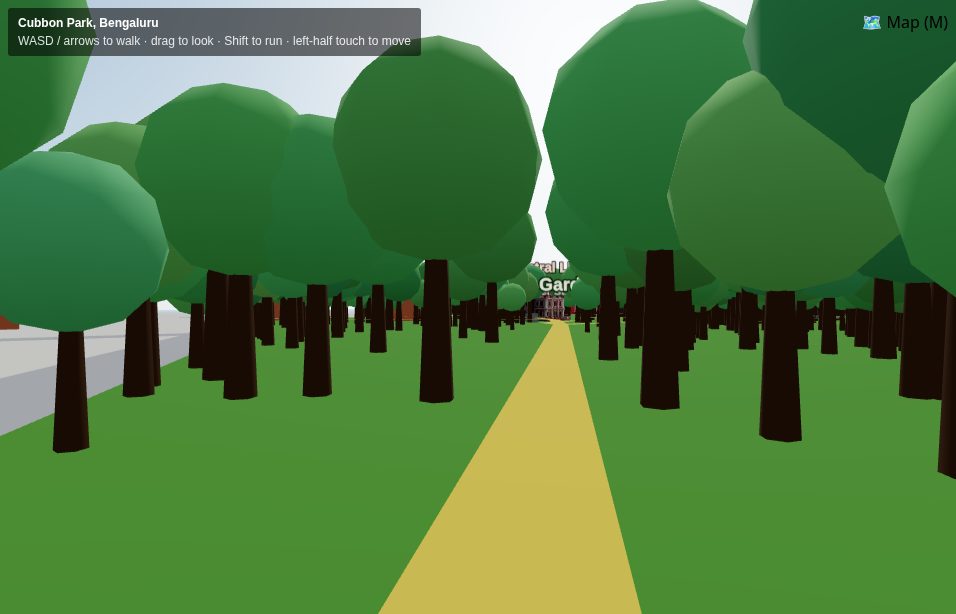
I wanted a navigable version of Cubbon Park in Bengaluru that matches the real layout: the yellow walking paths, Vidhana Soudha, the High Court, the State Central Library, the Bandstand, the boating lake, the statues and the gates.
The scene is built from coordinates on the NID Cubbon Park map, and the landmark buildings are AI-generated 3D models, so it was also a test of how well an image-to-3D pipeline holds up inside a real scene.
2.How it works
Map pixels as world coordinates
Everything is positioned in pixel coordinates on the 2000 by 1154 NID map and converted with one function, W(px, py), where 1 world unit is about 10 map pixels or roughly 8 m. The park outline, the yellow paths, surrounding roads, buildings, statues, gates, areas and lakes are plain arrays of those coordinates.
Paths are ribbons of flat quads with polygonOffset so they sit on the ground without z-fighting. 700 trees are scattered with a seeded mulberry32 generator, rejected if they fall outside the park polygon, near a path, inside a building footprint or in a lake, and drawn as two InstancedMesh objects for trunks and crowns.
Image to GLB landmarks
scripts/generate-cubbon-models.mjs writes a prompt per landmark, generates an image with GPT-Image-2 via fal, then sends it to fal-ai/trellis on the queue API, polling until the GLB is ready. Each model is fitted to its real footprint in the browser: the code measures the bounding box, scales uniformly to fit width, depth and height, and drops it onto the ground.
Trellis does not guarantee orientation. Vidhana Soudha came out long on Z while the footprint was long on X, which squashed a wide facade into a tower. The fitter now compares the mesh's long horizontal axis with the footprint's and rotates a quarter turn when they disagree.
Fixing materials on generated models
The first build rendered every building black. glTF leaves metallicFactor unset, which defaults to 1.0, and with no environment map a fully metallic surface has nothing to reflect. The fix forces metalness 0 and roughness 1, renders both faces because Trellis meshes can be open on the side the source image never saw, computes vertex normals because the meshes ship without them, and adds the baked albedo as an emissive map at 0.32 so shaded faces don't go muddy.
Walking and labels
First-person movement builds a wanted velocity from the keys or joystick, normalises diagonals so they aren't faster, and eases toward it with lerp(want, 1 - 0.0015^dt), which is frame-rate independent. Labels started as DOM overlays, which ignored occlusion and filled the screen up close. They are now canvas-texture sprites in the depth buffer that scale with distance to hold a constant screen size and fade out past a maximum distance.
3.Try it
WASD or arrows to walk, Shift to run, drag to look, or use the touch joystick; switch to the bird's-eye map view.