Build log · Portfolio & Tools
How I built Illuminated Bio
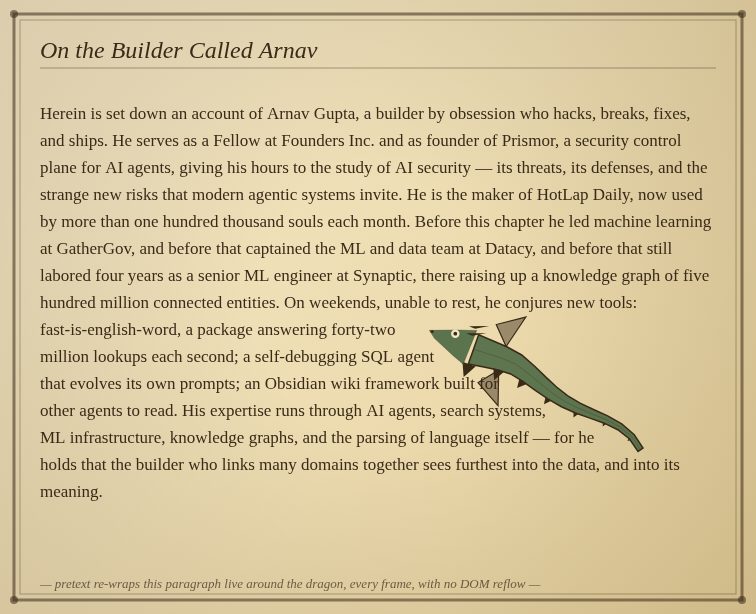
My bio set on parchment, re-wrapping every frame around a dragon that chases your cursor
1.Why I built it
I wanted to try pretext, a text layout library that measures and breaks lines with pure arithmetic instead of asking the browser to lay out the DOM. The demo I settled on is my bio written in the style of an illuminated manuscript, with a small dragon that chases the cursor across the page while the paragraph wraps around its body.
Real CSS text wrapping can't reflow on every mouse move without stalling. Pretext is cheap enough that the whole paragraph can be laid out again from scratch on every animation frame.
2.How it works
Line-by-line layout with pretext
The bio text is prepared once with prepareWithSegments, which does the measuring work up front. Each frame, layout walks down the page in 27 pixel bands. For each band it works out how much horizontal space is free, then calls layoutNextLine(prepared, cursor, width) to get the next line that fits that width, draws it with fillText, and carries the returned cursor into the next band.
Because the cursor tracks where the text left off, each line can have a different width and the paragraph still flows correctly. If a band has less than 60 pixels free, it is skipped and the text continues on the next band.
Turning the dragon into blocked intervals
The dragon's body is a chain of 15 circles. For each text band, every circle whose radius (plus a 10 pixel gap) reaches the band's centre line contributes a horizontal interval, using the chord half-width sqrt(r^2 - dy^2). The intervals are sorted and merged where they overlap.
A carveSlots function then subtracts those blocked intervals from the full line width, leaving the free slots. The layout takes the widest slot for that line. This interval approach works for any obstacle you can describe as circles, and it is much simpler than polygon clipping.
A dragon from a follow-the-leader chain
The head eases toward the pointer by 12 percent of the remaining distance each frame. Each following segment is then pulled so it sits exactly 15 pixels behind the one before it, which is the standard chain constraint for snakes and tails. With no pointer movement for 2.2 seconds, the head follows a slow figure-eight path instead.
The constraint keeps the backbone fairly straight, so a separate display pass adds a sine wave perpendicular to the body that travels down it over time, which makes it look like it is slithering. The wave only changes what is drawn and what the text wraps around, not the chase physics. The body is drawn as a ribbon built from left and right offsets at each segment's radius, tapering toward the tail, with the head, wings, horns and back spikes drawn as separate shapes on top.
3.Try it
Move your pointer over the page and the dragon follows it; leave it still and the dragon wanders on its own.