Build log · Portfolio & Tools
How I built Claude Code XP
A tabbed client for my real Claude Code sessions, styled like the Claude Code CLI
1.Why I built it
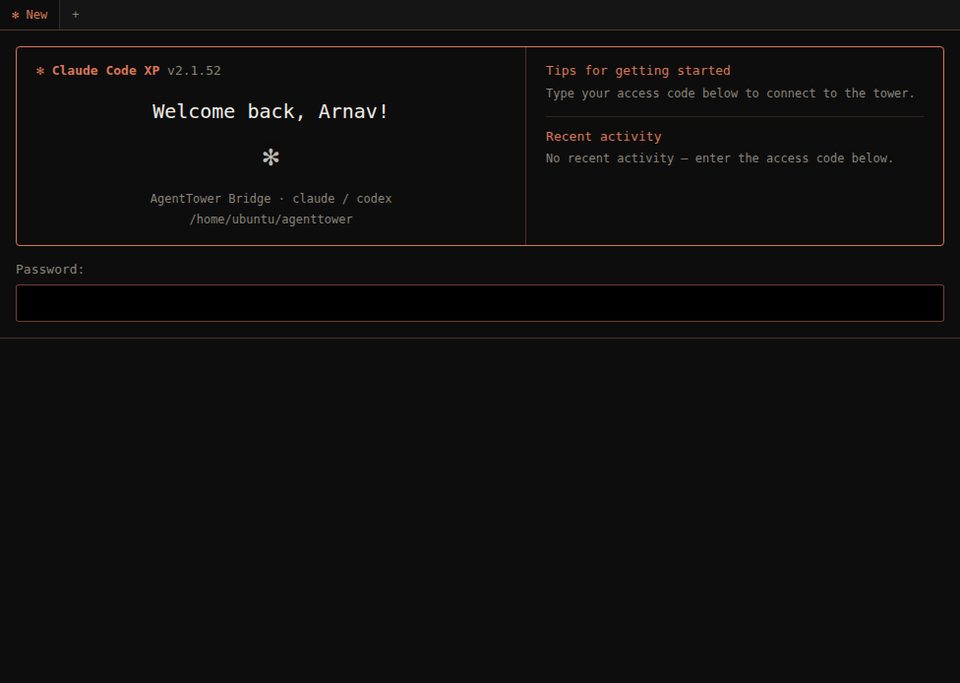
Claude Code XP began as a placeholder app on the desktop. When I built AgentTower, my web control room for Claude Code and Codex CLI sessions, I rebuilt it as a real client: a password-gated login, a list of real recent sessions, and a chat view where I can read a session's transcript and send it new messages.
It is styled after the Claude Code CLI, and it supports several tabs at once so I can keep more than one session open.
2.How it works
Keeping the backend address server-side
The client never talks to AgentTower directly. A catch-all Next.js route under /api/agenttower/v1/ forwards the method, query string, body and the browser's session cookie to the upstream API and relays the response and status back. The upstream address lives only in a server environment variable, so it never reaches client JavaScript and there are no CORS issues.
Sending a message starts a real claude -r run upstream, which can take minutes. The default serverless timeout was cutting that off with a 504, so the proxy route sets maxDuration = 300.
One typed client for three calls
The portfolio talks to AgentTower from three places: this app, the Terminal's agenttower command and AgentVille. Instead of hand-rolling the fetches a third time, I moved them into src/lib/agenttower.ts, a small typed client with login, list sessions, get session and send message. Each function returns null on any failure so callers just show a plain error line.
Sessions carry a provider (claude or codex), project, first prompt, modified time and an active flag. Messages are lists of content blocks, so when a transcript loads I skip meta messages, join the text blocks, and turn each tool_use block into a short "used <tool>" line.
Tabs that keep their state
Each tab is an independent session pane with its own login step, session picker and chat. All panes stay mounted and the inactive ones are hidden with display: none, the same pattern the Terminal app uses. Switching tabs keeps scroll position, drafts and login state exactly as you left them, with no state lifted into a parent store.
Each pane reports its current project name up to the tab bar so the tab label follows whatever session it has open.
Rendering replies as markdown
Agent replies were first shown as raw text, so bold, lists and code from the assistant appeared as literal asterisks and backticks. They now go through a small line-based markdown renderer the portfolio already had for its code editor's AI chat, which handles fenced code blocks, lists and inline formatting. If a send fails or times out, the pane shows that explicitly instead of an empty reply.
3.Try it
Enter the access code, pick a session from the recent activity list, then type to send a message into it; use + to open more tabs.