Build log · Simulations & Toys
How I built Falling Sand
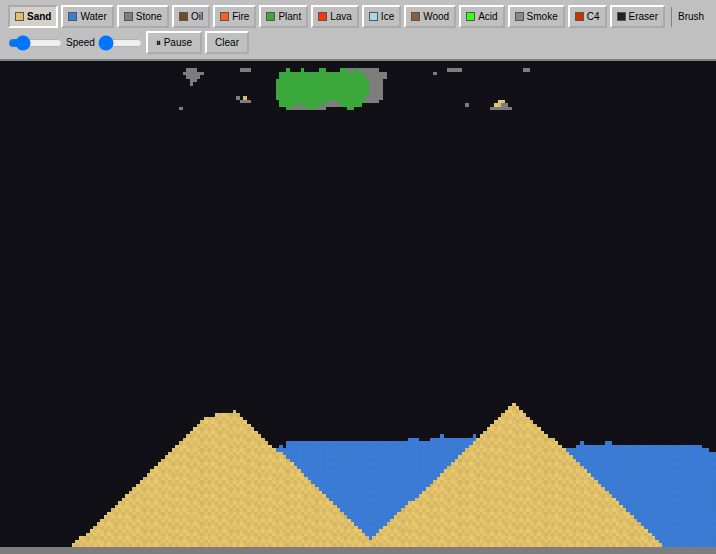
A 200x140 cellular automaton where sand, water, fire, lava, acid and C4 react
1.Why I built it
Falling sand games are a classic genre of browser toy, and I wanted one living on the desktop next to Minesweeper and Solitaire. It shipped in the same batch as those two, starting with five elements: sand, water, fire, oil and plant.
A week later I overhauled it. The grid grew to 200x140, and I added lava, ice, wood, acid, smoke and a C4 explosive, plus a speed slider and keyboard shortcuts. The point of the genre is the interactions between materials, so most of that work went into the rules for what happens when two elements touch.
2.How it works
Two flat byte arrays for the whole world
The world is a Uint8Array of 200x140 cells, where each byte is an element id (0 is empty, 1 is sand, up to 13 for C4). A second Uint8Array of the same size holds a per-cell life value. Fire uses it as a burn timer, lava as heat, ice as coldness, and steam, smoke and acid as a countdown before they vanish.
Every move is a swap of both arrays at two indices, so a burning cell carries its timer with it when it rises. Index math is just y * GW + x. With no objects per particle there is nothing to allocate during the simulation, which keeps 28,000 cells cheap to update every frame.
Scan order matters
Each step walks rows from the bottom up, so a grain that falls lands in a row that has already been processed and only moves once per step. The horizontal direction flips on alternate rows (y % 2), and sideways moves pick left or right at random. Without those two tricks, piles drift towards one side because the left neighbour always gets checked first.
Stone, plant and wood are skipped outright since they never move on their own. That cuts the work on scenes that are mostly solid.
Each element is a short rule
Sand falls straight down, or diagonally if blocked, and it can sink through water, oil and acid by swapping places with them. Water and oil fall, then slide sideways. Oil floats because it swaps upward with water above it 40% of the time. Lava is a slow liquid that only moves on 40% of steps. It loses heat randomly and turns to stone at zero, and it turns neighbouring water into steam, which also costs it 20 heat.
Fire spreads by checking its four neighbours: oil and plant ignite with a short timer and wood with a long one, while water or ice puts it out. When fire burns out it becomes steam 30% of the time, smoke 15% of the time, or empty. Ice gathers heat from nearby fire and lava and melts into water. C4 waits until it touches fire or lava, then fills a radius-7 disc with fire, leaving stone untouched.
Rendering at grid resolution, then scaling
Each frame writes RGBA values into an ImageData the exact size of the grid on an offscreen 200x140 canvas. That canvas is then drawn onto the visible 800x560 canvas with imageSmoothingEnabled = false and image-rendering: pixelated, so each cell becomes a crisp 4x4 block without drawing 28,000 rectangles.
Colour comes from a base palette plus some cheap variation. Sand and water get a fixed jitter from the cell index, like (i * 37) % 24, so the grains have texture that stays still. Fire, lava and ice shift colour with their life value, so a dying flame dims and cooling lava darkens towards stone.
Fixed-rate loop and smooth painting
A requestAnimationFrame loop adds up elapsed time and runs the simulation once every 16 ms or more, repeating step() 1 to 4 times based on the speed slider. All UI state the loop needs (tool, brush, paused, speed) is mirrored into refs so the long-lived loop never reads stale React state.
Pointer moves are interpolated with a simple line walk between the last and current grid position, so fast strokes don't leave gaps. A separate rAF loop keeps painting at the cursor while the button is held, which is how you get a steady stream from a single spot.
3.Try it
Pick an element and drag to paint; keys 1-0 pick elements, [ and ] resize the brush, Space pauses and C clears.